Essential Project Permissions in Autodesk Forma (formerly Autodesk Construction Cloud) to Get Started
Project Sync: Essential Project Permissions Required in Autodesk Forma (formerly Autodesk Construction Cloud) to Set-up your SyncEzy Account & Integrations
For Project Sync:
To sync projects, the user credentials used to connect your Autodesk Forma (formerly Autodesk Construction Cloud) account in your SyncEzy integration need to have admin access to all the projects you want to connect.
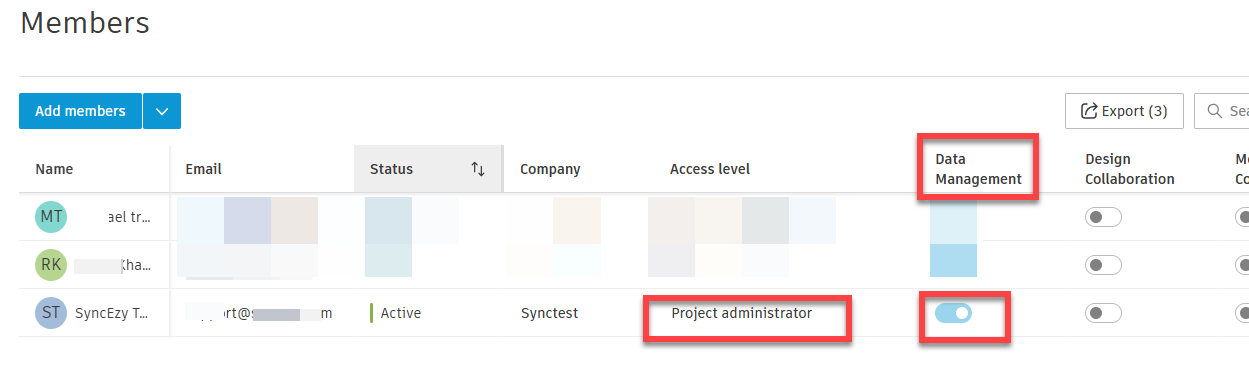
So for all the projects that you will configure, the authenticated user needs to have Admin access to those projects in Autodesk Forma cloud. Your Admin access on those projects will ensure smooth syncing of files and folders between Autodesk Cloud to SharePoint and vice versa.
For installing app from Autodesk Marketplace:
To install the Autodesk and SharePoint integration app you can ask your Hub Admin (Account Admin) to install it on your company. As a Project Admin you might not have access to install the app.
To install the app the user can use the steps below:
1. Navigate to https://acc.autodesk.com/projects and login to your Autodesk account
2. Click "Hub Admin" OR Account Admin
3. Click "Apps"

4. Search for the app Two Way Sync for Autodesk Build® and SharePoint and click on it


6. Click "Authorise and Install"

Have a support question?
We offer three support channels:
Phone - #1 for Support
AUS: +61 2 9136 9448
NZ: +64 9 303 2999
UK: +44 203 670 1109
US: +1 720 500 9302